Live
Aircraft status and compliance state

 Airworthiness
Software module
 Airworthiness
Every due date in your fleet, from one engine: AD/SB control, model tree configuration, component lifecycle tracking, and release status visibility.

Full Compliance
AD, SB, and task applicability by aircraft context
Configuration Control
Model tree, LLP limits, and component lineage
Real-Time Status
Airworthy, caution, maintenance, and grounded states
Continuing airworthiness depends on accurate configuration, up-to-date compliance status, and traceable records. Without a connected system, teams face audit findings, missed AD/SB actions, and configuration drift.
Module scope
Manage ADs, SBs, task applicability, and mandatory actions by aircraft and component context.
Track model tree, install/remove actions, LLP limits, and serialized positions with full lineage.
Expose airworthy, caution, maintenance, and grounded status as a shared operational truth.
See how AD/SB tracking, component lifecycle, and aircraft status connect in an audit-ready workflow.
Request an airworthiness walkthroughOperational focus
Manage Airworthiness Directives and Service Bulletins with applicability logic by aircraft and component.
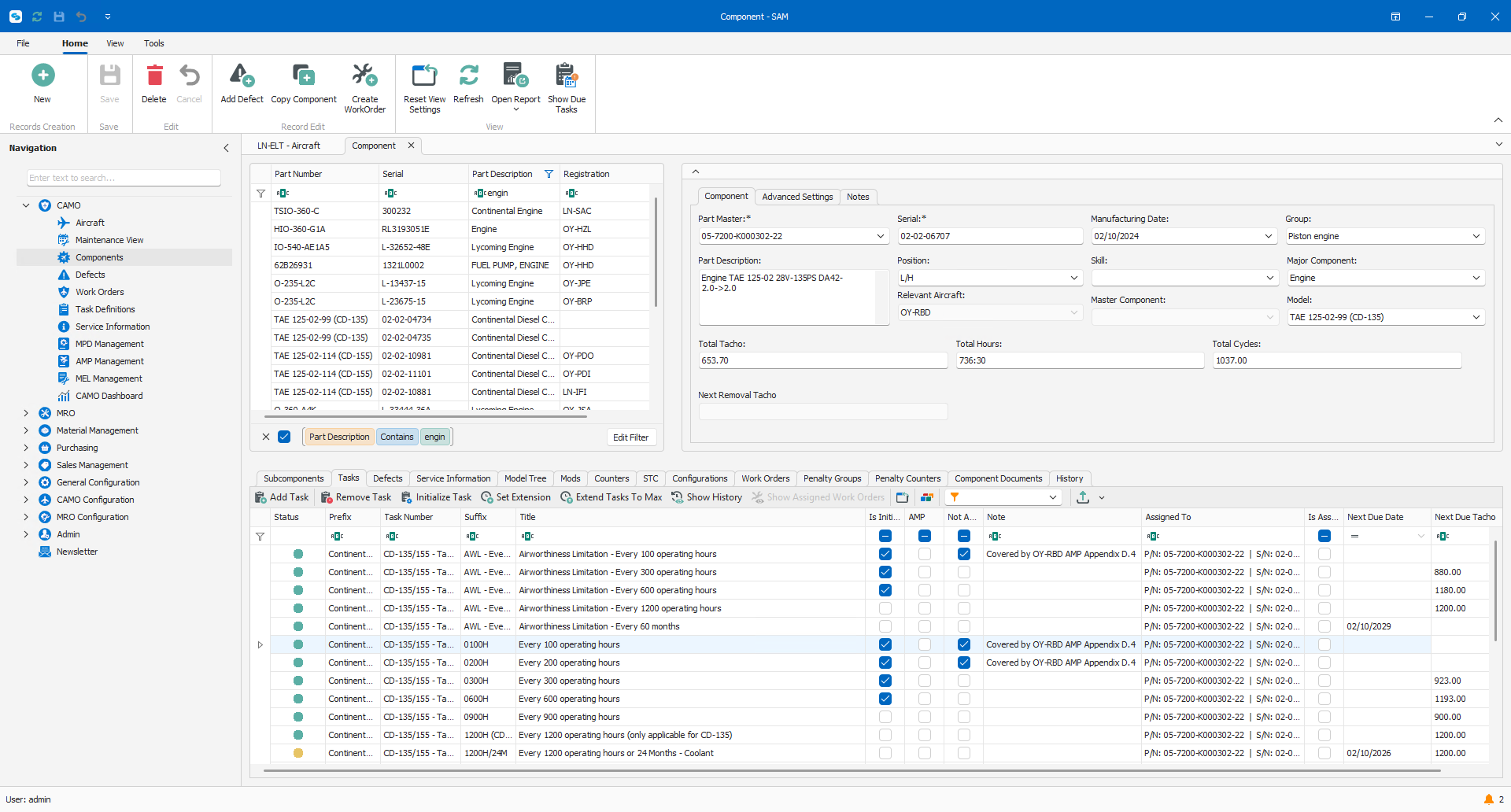
Track serialized components from installation through removal with full lineage and limit control.
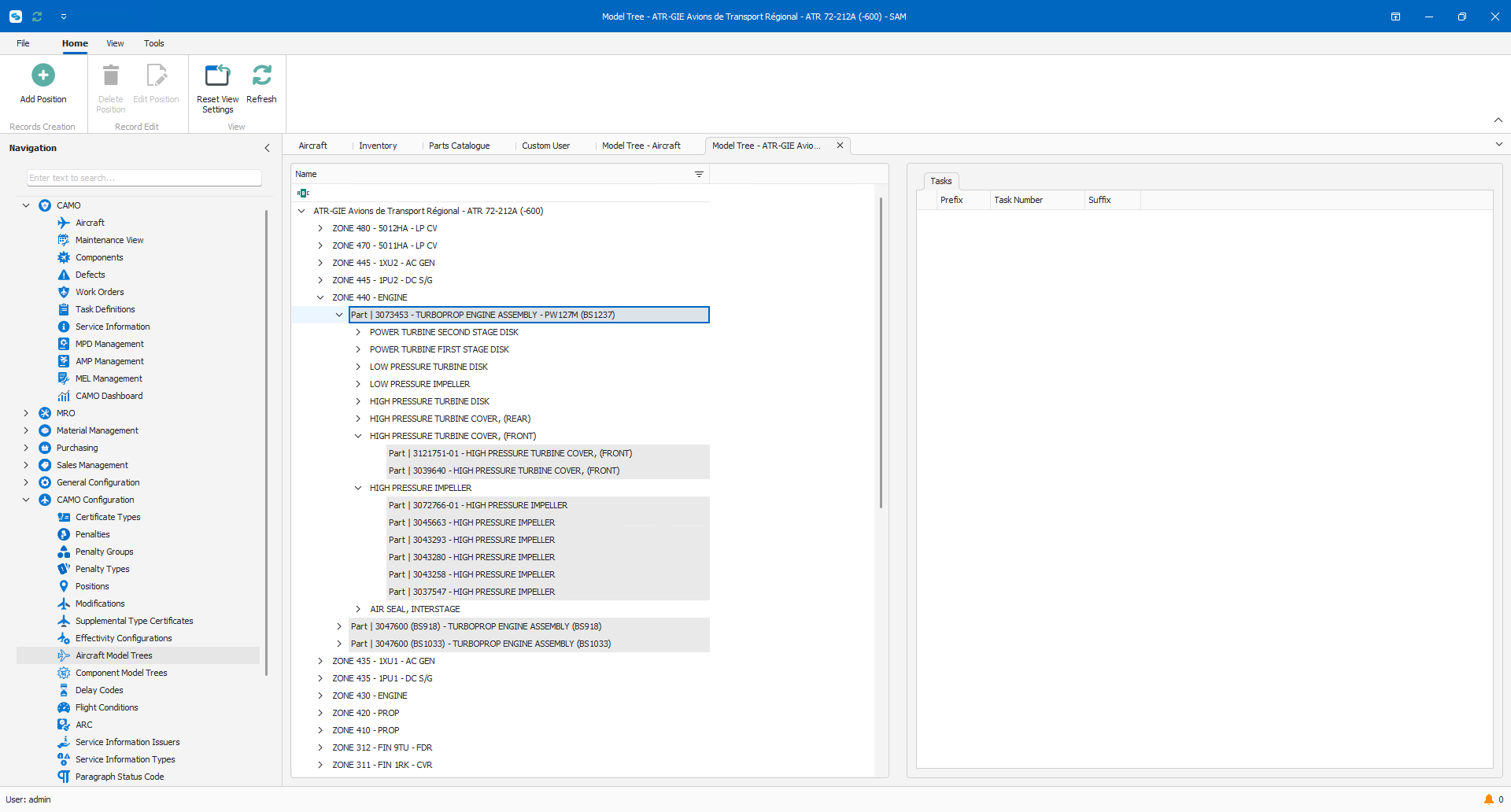
The model tree holds which component part numbers may be installed in each position on a model, and what is fitted in that position now. An engineer gets an immediate answer to the question that otherwise costs a phone call: can this part go here, and what is there at the moment.
Platform capabilities
Browse the functional controls available in the Airworthiness module, from compliance logic to component lifecycle tracking.
Manage aircraft operational status linked to maintenance activity.
Enter flight and journey log data for aircraft and maintenance tracking.
Track installed components, positions, and aircraft configuration changes.
View real-time status of aircraft components, including remaining life and due dates.
Manage serialized components with full life, usage, and installation history.
Track remaining life for LLPs by hours, cycles, or calendar.
Record removals, installations, and reasons for change.
Track aircraft modifications, configurations and ATC applicability.
Manage approved maintenance programs and task intervals for each aircraft and its components.
Maintain and control the approved Aircraft Maintenance Program.
Plan upcoming maintenance based on intervals, flight hours, cycles, or calendar limits.
Import tasks or define new ones for maintenance planning and execution.
Apply the same task across multiple aircraft or components.
View, update, and control CAMO work orders from creation to close.
Track deferred defects, MEL/CDL items, and their expiry limits.
Create and manage MEL items, deferrals, and expiry limits per aircraft.
Record, track, and manage reported defects and corrective actions.
Enforce second sign-off requirements for defined tasks.
Manage service letters, service bulletins, and related technical information.
Track Airworthiness Directives and Service Bulletins and their compliance status.
Define and manage AD/SB applicability across aircraft and components.
Evaluate and record the impact of new or revised technical publications.
Store and manage technical records, manuals, and compliance documents.
Monitor compliance against EASA, FAA, or authority-specific requirements.
Maintain a full audit trail of changes, approvals, and sign-offs.
Define and track custom counters beyond hours, cycles, and calendar.
Analyze defects, delays, and component data for reliability programs.
Build reports using your own data, filters, and layouts.
Provide controlled access for authorities or customers during audits.
CAMO software is used to plan and control continuing airworthiness. It manages Airworthiness Directive and Service Bulletin compliance, component lifecycle, model tree configuration, and aircraft status in one connected system, so airworthiness records stay accurate and audit ready.
The system applies AD and SB requirements against your aircraft and component configuration, calculates due dates automatically, and updates compliance status as work is completed and recorded, giving CAMO teams a real time view of open and closed actions.
Model tree tracking maintains a live record of installed components and their positions on each aircraft. It links configuration, LLP limits, and installation history together, so any change to the aircraft build state is traceable back to source.
Yes. LLPs are tracked by hours, cycles, or calendar limits, with remaining life calculated automatically and removal actions flagged before limits are reached, reducing the risk of an LLP exceeding its approved life.
Every compliance action, component change, and aircraft status update is recorded with full traceability. This gives auditors and authorities a complete record that is ready for review without manual reconstruction of history.
Yes. CAMO software focuses on planning and controlling continuing airworthiness, while MRO software focuses on executing maintenance work. SAM Maintenance handles the execution side, connected to the same operational data model.

See applied to your fleet profile, regulatory context, and daily workflows. Built around your questions, not a fixed script.